

Tool Data for DSC FCTR

Access thousands of cutting tool specifications form leading manufacturers and seamlessly import them into DSC FCTR. Save time, reduce errors, and optimize your tool management workflow.

What Is DSC FCTR?

At DSC Software AG, we are passionate about bringing people, processes, and systems together. Our hearts beat for your product data.

Get inspired by our fascination with integration. Committed to innovation, empathy, and partnership, we accompany you in the concrete implementation of your digitalization strategy: with SAP as the central, digital data basis for your business processes, enhanced with tailor-made best-practice solutions.

As a long-term SAP partner, we stand by your side as an experienced and fantastically connected companion. Our team combines more than 1,100 years of PLM know-how directed to one single goal: creating the best possible solution to your individual challenges. We help you convert your brilliant ideas into smart products even more quickly and keep being ready for the future.

Factory Control Center | FCTR complements the SAP-assisted product development process with CAM integration, complete tool data management in SAP, and detailed planning of tools and operating re-sources, connected to shop floor systems.

This allows the seamless organization in SAP even of processes like determining tool requirements, providing NC programs, and documenting correction data for the tool presetters. SAP standard objects such as Document, Material, Bill of Material, Equipment, Routing, and Production Resource are the basis of FCTR, and the solution supports all order-related processes in manufacturing.

One system centrally manages all of the relevant data, and automatically provides this data where necessary.

FCTR complements the SAP-assisted product development process with CAM integration, enabling the seamless organization of processes such as determining tool requirements, providing NC programs, and documenting correction data for tool presetters — all within SAP.

FCTR maps complete tool management in SAP, allowing individual and complete tools as well as measuring and operating equipment to be classified and managed in accordance with standards — including bills of materials, 2D/3D geometries, cutting data, and schematic diagrams.

All relevant data is managed centrally in a single system and automatically made available wherever it is needed, giving users a reliable, at-a-glance overview tailored to every use case — from CAD/CAM and tool management through to DNC and shop floor systems.

Why Use ToolsUnited with DSC FCTR?

ToolsUnited brings together tool data from different manufacturers in a single, reliable source — ready to use for your application.

1,334,650 unique tool components

Access a continuously growing library of tool components from leading manufacturers — all in one place, ready to be pulled directly into your workflow

62 world class brands and manufacturers

Source tools from more and more internationally recognized tool manufacturers. Whether you work with Sandvik, Kennametal, Walter, or others — ToolsUnited brings their complete catalogs together in a single, unified interface.

Checked data quality & DIN/ISO compatibility

Every tool component in ToolsUnited is validated for data integrity and complies with DIN/ISO standards. This ensures your CAM or tool management system receives clean, consistent data — no manual corrections, no compatibility issues.

File exports optimized for DSC FCTR

ToolsUnited generates tool data exports specifically formatted for DSC FCTR. Import-ready files ensure seamless compatibility and save your team the time spent on reformatting or data cleanup.

Trust the expert — because no one explains the value better than the people working with it firsthand.

%title%

Our customers are very successful in using ToolsUnited’s automated data transfer to initially populate master data in SAP for their tool management with Factory Control Center (FCTR).

Georg Frey, SENIOR CONSULTANT | Product Manager, DSC SOFTWARE AG
Watch the How-To Video

See how to find and import tool data in just a few clicks — from search to ready-to-use tool assembly.

Follow the Step-by-Step Guide

New to the integration? Our guide walks you through setup and your first successful tool data transfer, step by step.

1

Import tools from ToolsUnited to Factory Control Center | FCTR

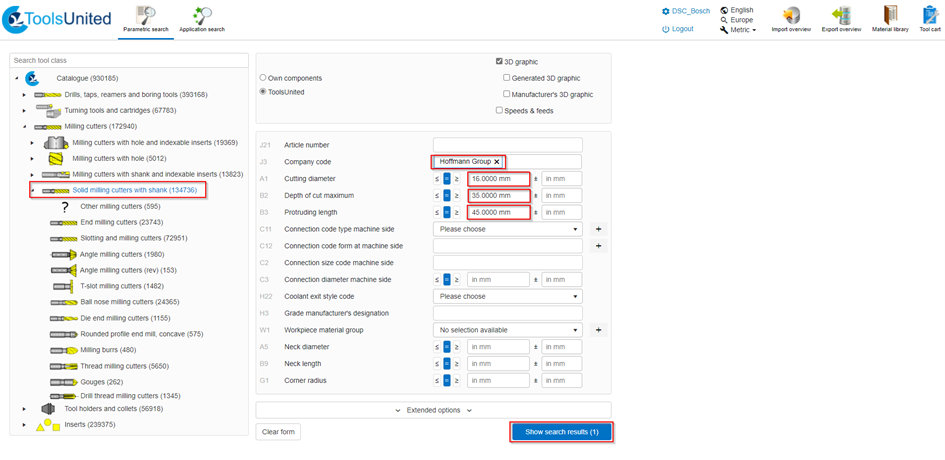
  • Log onto the website www.toolsunited.com to search for tools in the database.
  • The so-called “Parametric search” is one option for searching for tools.
2

Import tools from ToolsUnited to Factory Control Center | FCTR

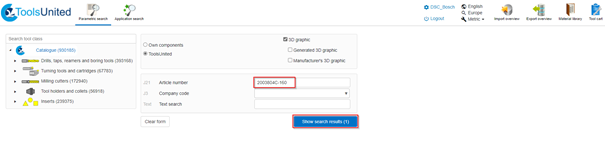
Another option is to directly enter the article number of the tool manufacturer.
3

Exporting the data from ToolsUnited

  • When you have found a suitable tool, you can export it by clicking on “DSC FCTR export” and “Start export”.
  • Once you have started the export, the download options are displayed.
  • You are free to choose the storage location of the tool.
4

Importing the data from ToolsUnited to FCTR​

  • Select an empty material from the desktop.
  • Press the right mouse button, and select the functions “FCTR” and “Import ToolsUnited Data”.
5

Importing the data from ToolsUnited to FCTR​

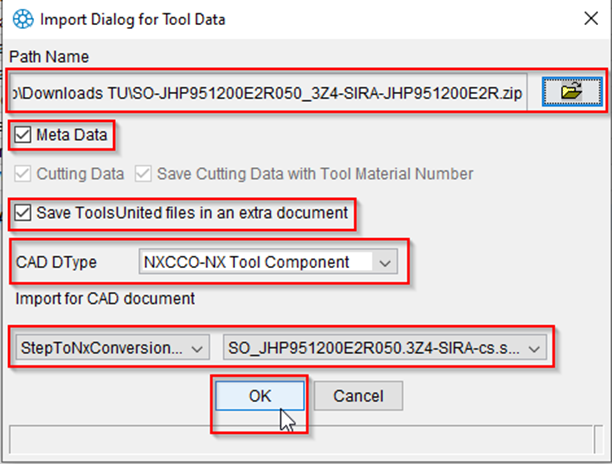
From the Import Dialog for Tool Data, select the path and the downloaded file.

6

Importing the data from ToolsUnited to FCTR​

Check the Import Dialog for Tool Data, and confirm with OK if all of the data is correct.
7

Importing the data from ToolsUnited to FCTR​

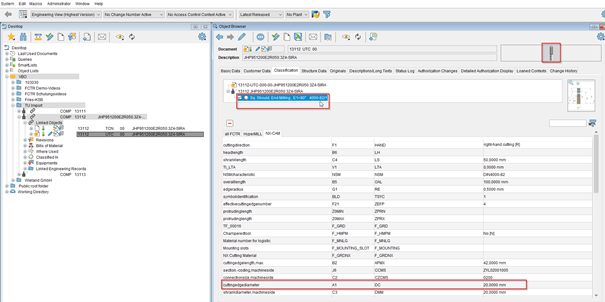
Before the import process starts, the tool data is checked. For example, the “Standard Number”, “Description” and “cuttingedgediameter”.
8

Importing the data from ToolsUnited to FCTR​

A right mouse click on the UTC object opens the 3D model in the CAD environment.

Any questions?

If you have any questions, please contact our support. We are happy to help!