
Tool Data for Janus Technology Manager

Access thousands of cutting tool specifications form leading manufacturers and seamlessly import them into Janus Technology Manager. Save time, reduce errors, and optimize your tool management workflow.

What Is Janus Technology Manager?

JANUS Technology Manager is a software solution designed to support the organization, standardization, and management of manufacturing and tooling data within CNC production environments. The system helps manufacturers centralize technical information, streamline production workflows, and improve consistency across programming, tooling, and shopfloor operations.

Developed by JANUS Engineering, the Technology Manager integrates with CAD/CAM and CNC manufacturing processes to provide structured access to tooling, machining, and process-related data. By improving transparency and reducing manual data handling, the solution supports more efficient and reliable digital manufacturing operations.

Why Use ToolsUnited with Janus Technology Manager?

ToolsUnited brings together tool data from different manufacturers in a single, reliable source — ready to use for your application.

1,334,650 unique tool components

Access a continuously growing library of tool components from leading manufacturers — all in one place, ready to be pulled directly into your workflow

62 world class brands and manufacturers

Source tools from more and more internationally recognized tool manufacturers. Whether you work with Sandvik, Kennametal, Walter, or others — ToolsUnited brings their complete catalogs together in a single, unified interface.

Checked data quality & DIN/ISO compatibility

Every tool component in ToolsUnited is validated for data integrity and complies with DIN/ISO standards. This ensures your CAM or tool management system receives clean, consistent data — no manual corrections, no compatibility issues.

File exports optimized for Janus Technology Manager

ToolsUnited generates tool data exports specifically formatted for Janus Technology Manager. Import-ready files ensure seamless compatibility and save your team the time spent on reformatting or data cleanup.

Trust the expert — because no one explains the value better than the people working with it firsthand.

%title%

“JANUS Technology Manager enables our customers to seamlessly integrate ToolsUnited data into Siemens NX CAM. In addition, the tool can be complemented with additional intelligence by means of attached information.”

Andreas Karp | JANUS Technology Manager

Follow the Step-by-Step Guide

New to the integration? Our guide walks you through setup and your first successful tool data transfer, step by step.

1

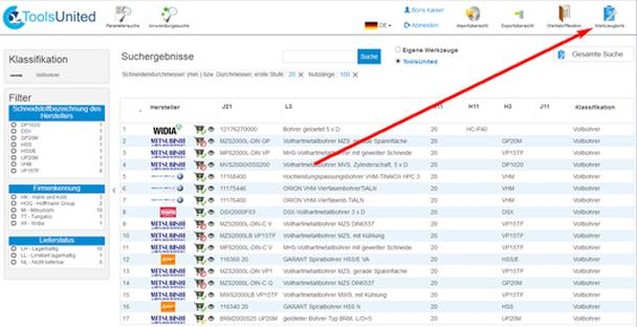
Visit ToolsUnited

In order to import data into the Technology Manager visit www.toolsunited.com and log in. Search for tool components as usual and save them in
your tool cart. Remember your tool carts name (standard is username and date) or rename it.
2

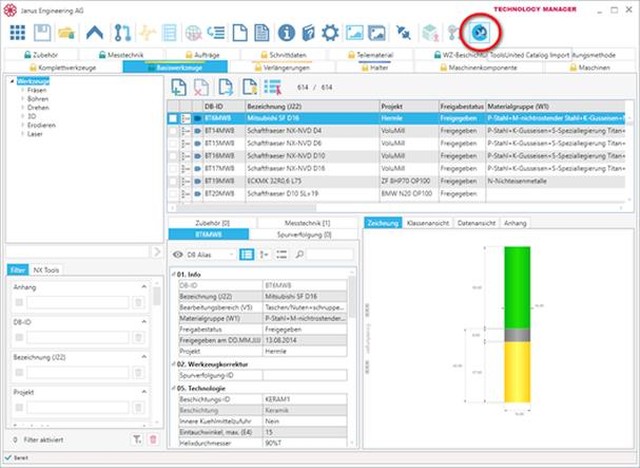
Open Import Wizard

Switch to the Technology Manager and open the Import Wizard by clicking the ToolsUnited button.
3

Import data

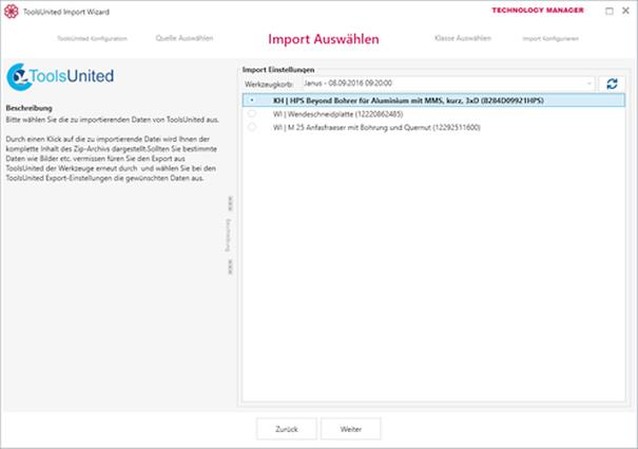
  • Choose the option “Catalog data from ToolsUnited Tool cart” and in the next window click “open ToolsUnited”.
  • You’ll be uniquely asked to enter your ToolsUnited account details.
  • Your ToolsUnited tool carts will be displayed


Pick the desired tool cart from the pull-down menu and then choose a tool. The Import Wizard of the Technology Manager will guide you through the necessary steps for the import. A few clicks later, all data and graphics of ToolsUnited will be available in your Technology Manager.

Any questions?

If you have any questions, please contact our support. We are happy to help!